
Image DPI Checker
Check an image's real embedded DPI/resolution and exact print size — from EXIF, JFIF, or PNG metadata.
Written by SamundraLast updated
Drag and drop files here
Supports .jpg, .png, .webp, and .gif — multiple files at once
A DPI value only exists if it was actually embedded in the file — most web images (screenshots, social media downloads, many exports) have none at all, which isn't a problem for on-screen use. This checks what's really there rather than assuming a number.
No files yet
Add an image above to check its DPI.
Related tools

Introduction
Image DPI Checker
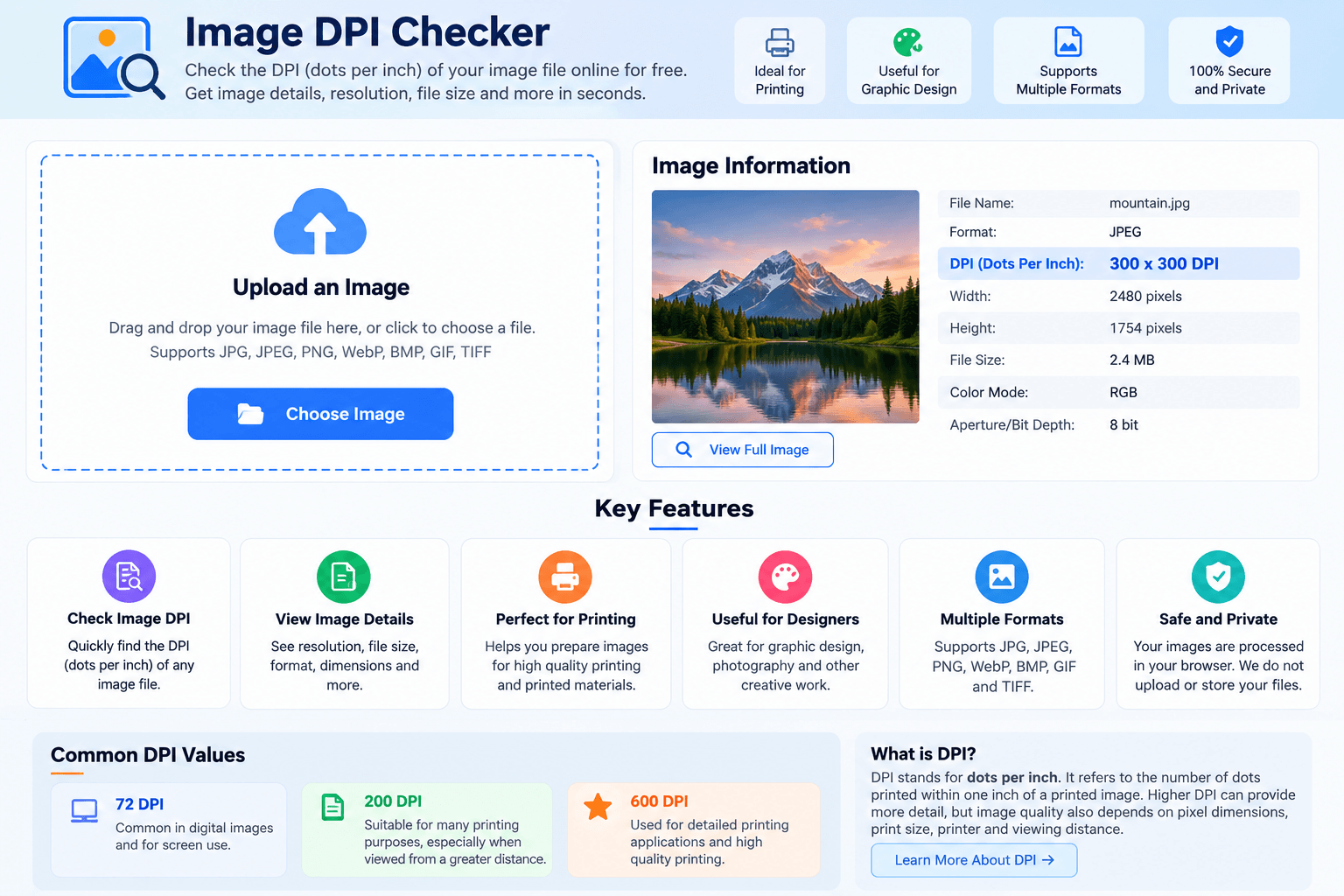
Image DPI Checker is a lightweight online tool that enables you to retrieve the DPI information of an image file. If you are creating an image for printing and are unsure of its DPI, you need to upload it in the tool and then check the available DPI data for it in a few seconds.
DPI stands for dots per inch. It is used mostly in printing to specify how many dots are produced within one inch of a printed image. DPI is useful when you are creating photos, documents, designs, and other printed items where print quality matters.
The DPI checker is easy to use and does not require any special technical know-how. It can help photographers, designers, students, printing professionals, or anyone who needs to know an image's resolution before printing.
What is DPI in an Image?
DPI, or dots per inch, refers to a measurement that is commonly used in printing. It is a way to specify how many dots can be produced within one inch of a printed image.
You may see values like 72 DPI, 200 DPI, 300 DPI, or 600 DPI when you’re dealing with digital images. Some values are appropriate for different uses. For instance, an image that needs to be printed at a high quality would have different needs than an image that will just be looked at on a screen.
But DPI isn't the only factor in image quality. Physical dimensions, the print size, the printer, and how close it will be looked at also matter. Setting a higher DPI doesn't automatically make a small, low-res image higher-res.
What’s the Difference Between DPI and PPI?
DPI and PPI are similar concepts that are not exactly the same.
DPI stands for dots per inch, and is mainly for printing. PPI is short for pixels per inch, and is more commonly used for digital images and displays.
Understanding the difference between DPI and PPI can be handy in photography, graphic design, web sites, or print work. It can also help you understand why an image looks good on a screen but looks different when printed.
Why Is Image DPI Important?
Verifying an image’s DPI before sending it for print may help you in making a decision about using that image for your desired print size and purpose.
For instance, if you are preparing image prints, posters, documents or marketing materials, checking print resolution on an image in advance can prevent unexpected outcomes from happening.
You should also consider the image dimensions. As mentioned, DPI does not only determine image print quality. A large image with a sufficient number of image pixels can yield a great print. However, a small image can lose image detail when printed in a significantly larger format.
File size is not determined by DPI in one way only. Image dimensions, image file format, image compression and image data contents also affect file size.
72 DPI, 200 DPI, and 600 DPI
A 72 DPI value is something you may see in a digital image. It does not automatically mean that an image is of low quality. Image information, such as pixel dimensions and intended print size, determines the result.
200 DPI might be appropriate for many printing applications where extremely great detail is not required. The required quality can also depend on how far away the printed image will be viewed.
600 DPI is usually associated with many detailed printing needs. Using 600 DPI doesn’t necessarily imply that the final image will look better. The quality of the original image and even the quality of the printer also play important roles.
If you want high quality printing, it’s better to look at DPI together with pixel dimensions, print dimensions, and also consider the requirements for the printer or print shop.
Check Image DPI Online
You can check image DPI without using complicated software. Simply upload your image file to Image DPI Checker and let the tool display whatever information is available.
This DPI checker is compatible with checking digital images before printing, preparing image prints, the graphic design process, or other types of print. It provides a simple and convenient way to check DPI information for your image.
Supported Files, Limits & Output
Supported Input Formats:
JPG / JPEG
PNG
WebP
BMP
TIFF
GIF
File Limit:
You can check one image at a time.
The image must contain readable DPI information to display an exact DPI value.
Output Information:
DPI (Dots Per Inch)
Image width and height
Image resolution
File format
File size
Other available image information
Supported Devices:
Windows
macOS
Linux
Android
iOS
The Image DPI Checker works directly in your web browser, so you do not need to install additional software.
Try this Image Color Picker
How to use
Upload Your Image
Click the upload button and select an image file from your computer, mobile phone, or other device.

Let the Tool Analyze the Image
Once the image is uploaded, the DPI checker automatically analyzes the available image information. You do not need to change any settings manually.
Check the DPI and Image Details
View the DPI (dots per inch) along with other available details such as image resolution, width, height, file format, and file size.

Use the Information You Need
Review the DPI value to understand whether the image may be suitable for your intended printing or design purpose. You can then check another image whenever needed.
Frequently asked questions
What is an Image DPI Checker?
An Image DPI Checker is an online tool that helps you check the DPI (dots per inch) information stored in an image. It can also show other available image details such as resolution, dimensions, file format, and file size.
How can I check the DPI of an image?
Upload your image to the Image DPI Checker. The tool will analyze the image and display its available DPI information automatically.
Is 300 DPI good for printing?
300 DPI is commonly used as a target for many high-quality printing applications. However, the final print quality also depends on the image's pixel dimensions, print size, printer, and other factors.
Can I check the dimensions of my image?
Yes. If available, the tool can display the width and height of your uploaded image. For more detailed dimension information, you can also use an Image Size Checker.
Can I reduce the file size without changing the DPI?
You can use an Image Compressor to reduce image file size. Depending on the compression method and settings, it may reduce the file size while keeping the image dimensions or metadata unchanged.
Can I convert an image to another format?
Yes. You can use image conversion tools such as WebP to PNG, HEIC to JPG, AVIF to JPG, or SVG to PNG depending on the original image format and the output format you need.
Is the Image DPI Checker free to use
Yes. You can use the Image DPI Checker online without needing professional image-editing software.
Can I use the Image DPI Checker on a mobile phone?
Yes. A browser-based Image DPI Checker can be used on supported smartphones, tablets, laptops, and desktop computers.
Last updated:
Share this tool
Know someone who'd find it useful? Send it their way.